
What is a fiber media converter and what do TX and RX mean? A fiber media converter is a networking device used to bridge the gap between copper-based Ethernet cabling and optical fiber infrastructure. Inside this device, TX stands for Transmit (the port that converts electrical data into light pulses and shoots them out) and RX stands for Receive (the port that catches incoming light pulses and translates them back into copper Ethernet signals). To successfully connect TX and RX of two devices in a standard dual-fiber deployment, you must implement a cross-over configuration: connect the TX port of Device A directly to the RX port of Device B, and vice versa.
A fiber media converter is an essential physical layer device (Layer 1 of the OSI model) designed to interconnect disparate media types. In commercial, industrial, and telecommunication networks, copper unshielded twisted pair (UTP) cables are hard-limited by physics to a maximum transmission distance of 100 meters (328 feet).
By embedding an optical transceiver mechanism alongside a standard RJ45 copper interface, a fiber media converter allows enterprises to extend their local area networks (LANs) across kilometers or even tens of kilometers over single-mode (OS2) or multi-mode (OM3/OM4) optical fibers. It acts as an transparent electronic bridge, changing the physical transmission medium without altering the underlying data packets or network protocols.
To understand data flow in any telecommunication ecosystem, you must master the fundamental directional pathways of bidirectional communication. So, what does rx and tx mean in networking?
--TX (Transmission / Transmitter): This represents the outbound traffic channel. In a media converter, the TX side converts electrical copper voltages into optical waveforms.It uses a precision semiconductor light source—either a Vertical-Cavity Surface-Emitting Laser (VCSEL) for short-range multi-mode fiber or a Distributed Feedback (DFB) laser for long-haul single-mode applications.
--RX (Reception / Receiver): This represents the inbound traffic channel. The RX side features a highly sensitive solid-state photodetector (such as a Positive-Intrinsic-Negative [PIN] photodiode or an Avalanche Photodiode [APD]). It captures incoming optical photons from the glass core and converts them back into electrical bits.
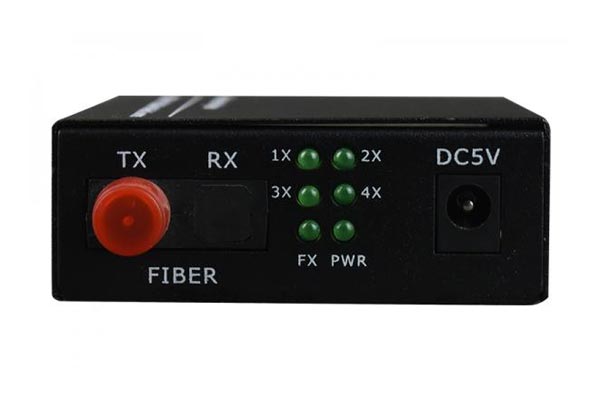
The fundamental difference between rx and tx comes down to their data direction and hardware components:
-- TX is the source of the signal, pushing data out into the network via an optical laser.
-- RX is the destination of the signal, drawing data in from the network via a photodetector.
In single-mode networks, the optical link budget relies heavily on both components operating within strict limits. If the TX output power is too high or the RX photodetector is starved of light, the link drops.
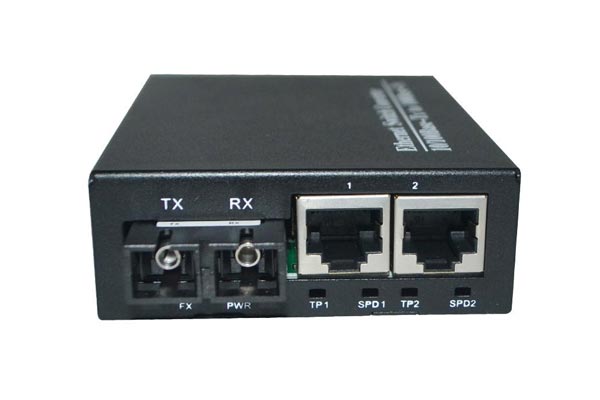
When deploying hardware from Unitekfiber, understanding what is tx and rx in media converter systems depends heavily on whether your infrastructure relies on dual-fiber or single-fiber (BiDi) architectures.
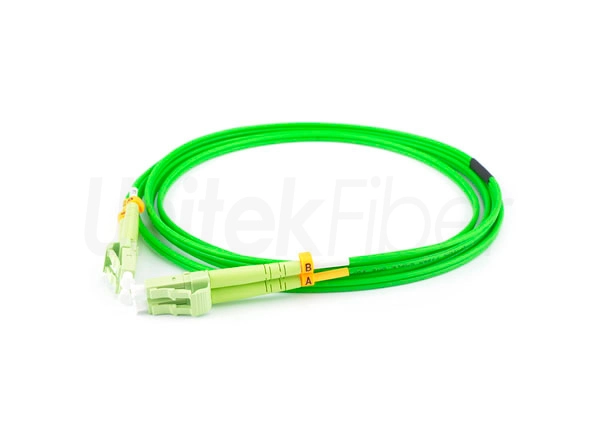
Traditional media converters use two distinct strands of fiber glass enclosed within a patch cable.
One fiber strand connects the TX of Device A to the RX of Device B.
The second fiber strand connects the RX of Device A to the TX of Device B.
Both paths typically operate at identical optical wavelengths (e.g., dual 1310nm for single-mode or dual 850nm for multi-mode).
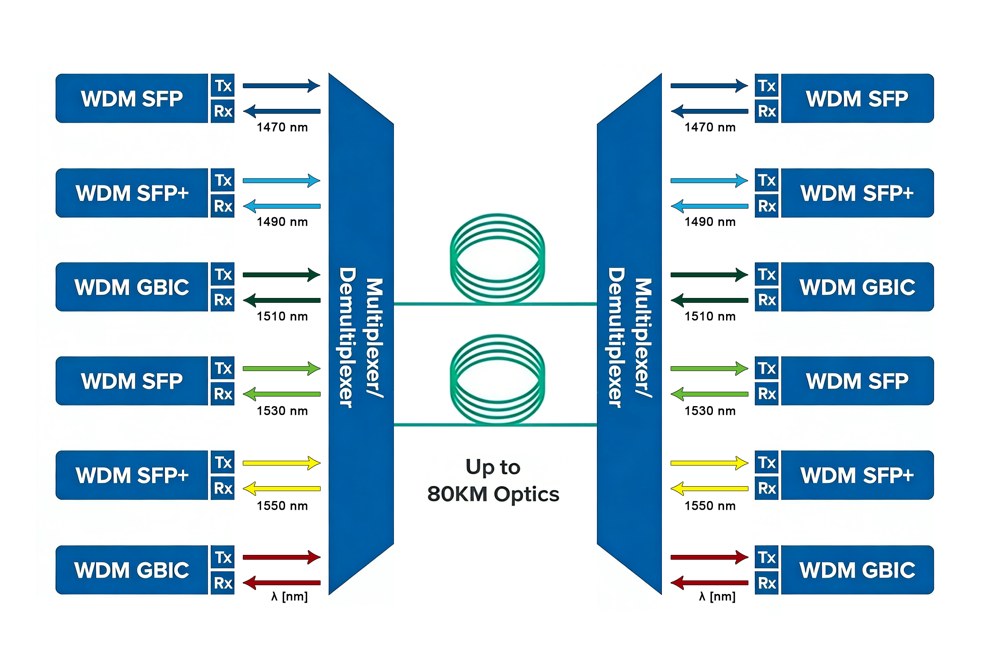
To optimize fiber infrastructure and reduce fiber leasing fees, Bidirectional (BiDi) converters collapse both paths onto one single glass core. They separate TX and RX using Wavelength Division Multiplexing (WDM) prisms inside a single optical port.
Type A Converter: Transmits (TX) at 1310nm and Receives (RX) at 1550nm.
Type B Converter: Transmits (TX) at 1550nm and Receives (RX) at 1310nm.
| Parameter Metric | Dual Fiber Media Converter | Single Fiber (BiDi) Media Converter |
| Physical Fiber Ports | 2 Ports (TX & RX labeled separately) | 1 Port (Simplex optical connection) |
| Fiber Cores Needed | 2 Glass Cores | 1 Glass Core |
| Wavelength Mechanics | Identical on both paths (e.g., 1310nm) | Multi-Wavelength (e.g., 1310nm TX / 1550nm RX) |
| Hardware Deployments | Legacy LAN Backbones, Campus Backbones | FTTx Drop Lines, Fiber-Constrained Metros |
| Inventory Requirement | Identical units at both ends | Must pair a Type A unit with a Type B unit |
The most common point of failure for system integrators during field installation is improper patch cable routing.== Here is the engineering protocol on how to connect tx and rx of two devices properly.
When interconnecting two dual-fiber media converters, your fiber patch cords must be crossed, not parallel.==
[Local Converter A]                 [Remote Converter B]
    (TX Port)   --------------------->   (RX Port)
    (RX Port)   <---------------------   (TX Port)
If a field technician connects TX to TX and RX to RX, the laser from Converter A will blast straight into the optical laser of Converter B. Neither photodetector will receive any light signal, causing the fiber link LED indicator (FX LINK) to remain completely dark.
When using fiber optic fier media converter to connect different devices, you must pay attention to the different ports used.
1.1 When fiber media converter connect to the 100BASE-TX equipment (switch, hub), you need to confirm that the length of the twisted pair cable does not exceed 100 meters; and connect one end of the twisted pair to the RJ-45 port (Uplink port) of the fiber optic media converter, and the other end to the RJ-45 port (common port) of the 100BASE-TX device (switch, hub).
1.2 When optical fiber media conveter connected to the 100BASE-TX equipment (network card): you may confirm that the length of the twisted pair cable does not exceed 100 meters; and connect one end of the twisted pair to the RJ-45 port (100BASE-TX port) of the fiber optic media converter, and the other end to the RJ-45 port of the network card.
1.3 When fiber optic media converter connected to the 100BASE-FX: you may confirm that the length of the optical fiber does not exceed the distance range provided by the equipment; and one end of the optical fiber is connected to the SC/ST port of the optic fiber media converter, and the other end is connected to the SC/ST port of the 100BASE-FX device.
Always perform a Loopback Test during troubleshooting: If the fiber link fails to establish, run a short patch cable directly from the TX port to the RX port of the same media converter. If the local FX link light initializes, your converter is functional, meaning the issue lies further down your structural fiber run or in an inverted cross-connection.
Beware of Receiver Saturation: If you are testing a high-power 40km or 80km single-mode media converter on a short test bench, the TX laser power can permanently blind or degrade the remote RX photodiode. Always patch in an inline optical attenuator (e.g., a 5dB or 10dB fixed attenuator) during close-range testing to simulate long-distance loss.
The above content is UnitekFiber's briefly introduction to the difference between TX and RX fiber optic media converters. UnitekFiber is a professional fiber optic products supplier of optical transceivers, optical fiber media converters, optical switches, optical fiber patch panels and optical fiber cables. If you need more information or support on fiber optical products, please don’t hesitate to contact us sales@unitekfiber.com, we will try our best to support you.
What is fiber media converter troubleshooting if the FX light is off?
When the FX (Fiber) link light is off, it indicates a hardware layer disruption along the optical path. First, verify that you crossed your patch cords (TX to RX and RX to TX). Second, inspect your fiber end-faces with a fiber scope for dirt or oil contamination, which can cause high attenuation. Finally, measure the link with an optical power meter to ensure your total loss does not exceed your hardware's link budget.
What happens if I connect TX to TX and RX to RX by mistake?
If you accidentally connect TX to TX and RX to RX on a dual-fiber media converter, no network traffic will pass, and the connection will fail to initialize.However, because Class 1 telecommunication lasers operate at safe, controlled power levels, an improper cross-connection will not damage or burn out your optical components. Simply swap the fiber positions at one patch panel to restore normal operations.
Do single-fiber BiDi media converters require manual TX and RX matching?
No, single-fiber BiDi media converters do not require manual TX and RX crossover cables because they utilize a single optical port. However, you must match a Type A device with a Type B device at opposite ends of the link. If you connect two Type A devices together, both will attempt to transmit at the same wavelength (e.g., 1310nm) and receive at the other (e.g., 1550nm), resulting in zero data throughput.
Can I connect a 1310nm dual-fiber media converter to a 1550nm dual-fiber media converter?
No, you cannot connect a standard 1310nm dual-fiber media converter directly to a 1550nm dual-fiber media converter. The photodetector (RX) on the 1310nm device cannot properly demodulate the 1550nm optical signal over distance due to hardware optimization differences, and vice versa. For dual-fiber communication to succeed, the operating wavelengths of both transceivers must match exactly.
To verify the fiber polarization configurations, link-layer metrics, and engineering criteria detailed in this deployment guide, please reference the official international standards below:
 5G 6G Fronthaul & Backhaul
View More
5G 6G Fronthaul & Backhaul
View More
 Data Center & Cloud Interconnect
View More
Data Center & Cloud Interconnect
View More
 Enterprise & Industrial Optical
View More
Enterprise & Industrial Optical
View More
 FTTx & Access Solutions
View More
FTTx & Access Solutions
View More
 Metro & Access Networks
View More
Metro & Access Networks
View More
 Optical Cabling Systems
View More
Optical Cabling Systems
View More
 Optical Transceivers & Interconnect
View More
Optical Transceivers & Interconnect
View More
 WDM & High-Capacity Transmission
View More
WDM & High-Capacity Transmission
View More
+86-755-21034367